


What safety features are included in the 2021 Toyota Venza? The Toyota Venza has returned to the impressive lineup of Toyota crossovers and SUVs, this time as a fully hybrid vehicle. It’s a family-friendly vehicle that offers much in the way of cargo space and infotainment technology that everyone can enjoy. And speaking of technology, safety features are also a vital part of any car, and the Venza delivers there as well. What safety features are included in the 2021 Toyota Venza? Read ahead for a rundown on what’s available. Standard safety features The 2021 Toyota Venza is available in three trims: LE, XLE, and Limited. Even with the base LE trim, you will have access to plenty of quality safety features. In addition to a rear-view camera, all Venza models come standard with Toyota Safety Sense 2.0. This is a suite of smarty safety technologies that includes the Pre-Collision System with Pedestrian Detection, Lane Departure Alert with Steering Assist, Lane Tracing Assist, Automatic High Beams, Full-Speed Range Dynamic Radar Cruise Control, and Road Sign Assist. Another standard suite of safety features is the Star Safety System. This includes Enhanced Vehicle Stability Control, Traction Control (TRAC), the Anti-lock Brake System, Electronic Brake-force Distribution, Brake Assist, and Smart Stop Technology. There’s also Safety Connect®, which offers up the Stolen Vehicle Locator, Emergency Assistance, Roadside Assistance, and Automatic Collision Notification. This is a subscription-based service, but you’ll get a one-year trial subscription on the house to start off, with payment required for the subscription after that. Blind Spot Monitor with Rear Cross-Traffic Alert also comes standard, and that gets an upgrade in higher trims. Available safety technology The upgrade to Blind Spot Monitor we speak of is the available Blind Spot Monitor with Front and Rear Parking Assist with Automatic Braking. The bottom line here is that across the entire lineup, the 2021 Toyota Venza has your protection in mind, making almost all of its safety features standard. What are the 2021 Toyota Venza color options?
All
Technology
Tips & Tricks
Toyota Highlander
Toyota Comparisons
Toyota RAV4
Toyota Corolla
Toyota Prius
Toyota Tacoma
Dealership Info
Toyota Camry
Toyota Tundra
Toyota Venza
Toyota 4Runner
Community
Toyota Sienna
Safety
Toyota Corolla Cross
Toyota Mirai
Toyota Hybrids
Service
Cargo
Toyota GR Supra
Toyota Sequoia
Color Options
Holiday
Just for Fun
Towing
Toyota GR86
Toyota Prius Prime
Certified Pre-Owned
TRD Pro
Tips and Tricks
Toyota Corolla Hatchback
Toyota RAV4 Hybrid
Toyota Service
Electric Vehicles
News
Toyota bZ4X
Toyota Concepts
Toyota Land Cruiser
Toyota Leasing
Used Vehicles
Community Engagement
Performance
Toyota Avalon
Toyota Brand
Toyota C-HR
Toyota Crown
Toyota Crown Signia
Toyota GR Corolla
Stay connected in the car with Android Auto™
How do you use Android Auto in a Toyota? It’s no exaggeration to say that our smartphones are a huge part of our daily lives. With so much of our lives being lived online and with the assistance of mobile apps, staying connected is a vital component of living these days. Toyota understands this, and that’s why many new Toyota models come equipped with Android Auto, which allows users of compatible phones running the Android operating system to connect to the vehicle and use certain applications while in the car. How do you use Android Auto in a Toyota? Keep reading for a step-by-step process. Does the new Toyota Venza come with Android Auto? Steps for setting up Android Auto in your Toyota Connect your device using the USB media port in the center stack. This should automatically launch Android Auto on your device. Older operating systems/phones may require you to first install Android Auto from the Google Play store. Within the Android Auto App on the device, tap the button that says to connect. Tap through the on-screen instructions and accept or give permissions as needed or requested. On the vehicle’s multimedia touchscreen display, tap “On” to turn on Android Auto. Using Android Auto once it is set up Tap the tile on the home menu on the touchscreen display. You will see icons for certain applications, including Google Maps, your calendar, your phone, and other apps, all directly from your Android device. Press the icons as needed while being careful to pay attention to your driving. Use the Exit icon or press the Home or Menu button on the multimedia display at any time to return home and exit Android Auto. And that’s all there is to it! Android Auto is a convenient way to access some of your favorite features, including your favorite playlists or podcasts, and stay in touch with family and friends with hands-free calling and messaging while on the road. How do you use the Toyota App?
Get an overview of Toyota Safety Sense™ technology
How does Toyota Safety Sense 2.5 work? Have you seen us reference Toyota Safety Sense when discussing some of the technology and safety features on the latest Toyota models and wondered what exactly those systems entail? We know how helpful it is to see things in action to get that visual, so we wanted to share this video that Toyota has developed to explain its safety tech. If you have been asking, “How does Toyota Safety Sense 2.5 work,” then take a look at this video! Toyota Safety Sense 2.5 and 2.5+ demonstrations Is it time to service your Toyota? We have two service locations!
Need help with your Toyota App account?
How to manage your Toyota App account Today’s technological age is a marvel for vehicle owners in general, but it makes owning a Toyota particularly better. By driving a Toyota and signing up for a Toyota App account, you will gain access to a wide variety of functions, including remote access to select features on your vehicle, diagnostics, and more. This can sometimes be a tough area to navigate, so we wanted to show you this video that explains how to manage your Toyota App account. Take a look! How do you use the Toyota App? Demo of managing your Toyota App account View our inventory of new Toyota models
Toyota Safety Sense™ 2.5+ debuts in the new Camry
2021 Toyota Camry safety and technology features The Toyota Camry is a favorite among sedan drivers, and with good reason. It has long been a reliable, safe, and efficient car fit for just about anyone. That’s going to continue into the 2021 model year, as the 2021 Toyota Camry will debut the new Safety Sense 2.5+ for its drivers. That’s not the only update coming your way, however. Read ahead for more about the 2021 Toyota Camry safety and technology features! How does the Camry compare to similar sedans? What is Toyota Safety Sense 2.5+? Toyota is a trailblazer in safety, and the automaker has updated its impressive suite of smart safety technology to help better keep you safe. The Pre-Collision System with Pedestrian Detection has been given a few upgrades, including being able to detect a vehicle ahead as well as a preceding bicyclist in the daytime plus a preceding pedestrian in conditions with lower light. This system also gets a boost with intersection support, meaning at an intersection, the system might detect an oncoming vehicle or pedestrian while doing a left-hand turn. If it does detect a vehicle or pedestrian in that scenario, an audio or visual alert may be given, and it could even use automatic braking in some cases. This system will also add emergency steering assist to help stabilize the steering to remain in the lane in case of an emergent steering movement. Another feature is Full-Speed Dynamic Radar Cruise Control, which is meant to be activated when you’re driving over 30 mph. This system works to maintain distance between you and surrounding vehicles, maintaining a steady speed or stopping/resuming when necessary. A new feature for the 2021 model year is being able to more smoothly pass slower vehicles. Other Toyota Safety Sense™ 2.5+ features include Lane Departure Alert, Automatic High Beams, and Road Sign Assist. The Toyota Rear Seat Reminder will also now come standard across the 2021 Camry lineup. This system gives an alert if the rear door had been opened within 10 minutes of the car being turned on or at any time after the vehicle was turned off. The 2021 Camry will also be equipped with a standard backup camera and 10 standard airbags, as well as the brand’s Star Safety System, which includes Enhanced Vehicle Stability Control, Traction Control, Electronic Brake-force Distribution, Brake Assist, an Anti-lock Braking System, and Smart Stop Technology. Connectivity and infotainment Information and entertainment are also key to a good driving experience, and the 2021 Camry is up to the challenge. The base Toyota Audio system is easy to read and command with a seven-inch touchscreen, and whichever operating system you like on your smartphone, you should be set to connect your compatible phone to the car thanks to standard Apple CarPlay® and Android Auto™ functionality. You can also take advantage of the standard Amazon Alexa® compatibility, as well as other system features, including an AM/FM radio, SiriusXM® Satellite Radio with a three-month All-Access trial, Siri® Eyes Free, hands-free calling and messaging capabilities, advanced voice recognition, and Bluetooth® streaming. That audio system can be upgraded in higher trim levels to a nine-inch touchscreen display and available Dynamic Navigation. You can also opt for the available JBL® 800-watt, nine-speaker premium audio system to make your favorite playlists sound sharper than ever. A release date hasn’t been set yet for the 2021 Camry, but we look forward to welcoming it to our lot! Read about the safety features found in the 2020 Camry
Watch how you can stay connected to your new Toyota
How do you use the Toyota App? Did you know that many select new Toyota models come with the capability to remotely connect to an app on your compatible smartphone? With the Toyota App, you are able to access a number of different statistics and information about your vehicle, as well as take certain actions. The setup is easy, and once you’ve experienced the convenience, you won’t want to go back! How do you use the Toyota App? We have a video to explain below. Link your car to an Android or Apple smartwatch! Read how to connect Amazon Alexa to Toyota Remote Connect.
Does the new Toyota Venza come with Android Auto™?
2021 Toyota Venza standard and available technology Have you heard? The Toyota Venza is coming back, and this time it’ll be a hybrid crossover with bold, premium styling. Its hybrid powertrain will make it an efficient ride while its roomy and classy interior will provide a comfortable experience for the entire family. Toyota is an innovator, so that means you can expect a lot in the way of technology when this arrives in late summer 2020. Read ahead for some information on the 2021 Toyota Venza standard and available technology features. Toyota Venza audio and multimedia setup Connectivity is a huge component of life in today’s world, and you will be able to synchronize your compatible smartphone with the crossover whether your operating system of choice is Apple or Android. The standard system is Audio Plus, which comes with the LE and XLE trims and features an eight-inch touchscreen display. That screen gets an upgrade with the available Premium Audio with Dynamic Navigation and JBL, which is an option with the XLE trim and standard on the Limited model. That touchscreen increases to 12.3 inches in size and has controls that you can switch between the driver or the front passenger for operation. You will be able to play your favorite tunes with Apple CarPlay® and Android Auto™ functionality, which will also give you in-vehicle access to those systems’ respective voice-activated assistants (Siri and Google Assistant, respectively). The audio system also includes an AM/FM radio, Bluetooth® wireless functionality, and Amazon Alexa compatibility. Toyota Venza safety technology Safety is also key, and you will find plenty of safety technology inside the 2021 Toyota Venza. The new Venza comes standard with Toyota Safety Sense™ 2.0 (TSS 2.0). That includes such smart safety features as the Pre-Collision System with Daytime/Low-Light Vehicle and Pedestrian Detection and Daytime Bicycle Detection, Full-Speed Range Dynamic Radar Cruise Control, Lane Departure Alert with Steering Assist, Lane Tracing Assist, Road Sign Assist, and Automatic High Beams. You will also have a standard rearview camera to assist with driving in reverse. Star Gaze™ fixed panoramic glass roof The available Star Gaze™ fixed panoramic roof is another innovation in Toyota vehicles. This cool feature lets you switch between transparent and frosted modes with the push of a button. The frosted mode actually brightens the interior as it reduces direct sunlight, which makes the Venza remain a bright and open-feeling vehicle while inside. Can you buy a protector for your Toyota Prius catalytic converter?
Link your car to an Android or Apple smartwatch
How does Toyota Remote Connect work on smartwatches? Technology and connectivity are so engrained in our daily lives that it barely feels novel anymore, as it is more and more important to stay in touch with the world around us as often as possible. For that reason, many devices, including smartwatches, are used each day. You can connect these devices to a lot of new cars these days, including select new Toyota models, in order to access certain statistics or take certain actions like remotely locking or unlocking the doors. You can do that through Toyota Remote Connect for many new Toyota models. How does Toyota Remote Connect work on smartwatches? We included a video here to explain. Steps to connect your Toyota to your compatible smartwatch How do you connect Amazon Alexa to your Toyota vehicle?
Use this how-to guide to link your Toyota to Amazon Alexa
How do you connect Amazon Alexa to Toyota Remote Connect? Although it may be a cliché, you can look at just about any vehicle and say, “the future is now,” and that is especially true for Toyota, which has always been on the cutting edge of innovation and technology in the automotive world. Many recent Toyota models allow for connection to Amazon Alexa, the popular smart device and application that offers easy and convenient voice-activated information and entertainment. If your Toyota is equipped with this functionality and you have a compatible mobile device, you can take advantage of numerous Alexa features as well as remotely locking/unlocking your car, among other things. How do you connect Amazon Alexa to Toyota Remote Connect? Keep reading for a step-by-step process. How to pair your phone to Toyota Entune 3.0 Steps for connecting Amazon Alexa to your Toyota First, make sure that your vehicle is equipped with Remote Connect and you have already registered with Toyota Connected Services under your Toyota Owners account. If you haven’t done so yet, you’ll need to register prior to connecting your Alexa device. Once that is situated, sign in to your Amazon account on their website or open the Amazon Alexa app on your device. Then, in the menu under the Skills option, search for the Toyota skill. Enable that, then sign into the Toyota skill using the same username and password you use for your Toyota Owners account. Select your vehicle to link it, then create a four-digit PIN and hit Save. And that’s it! This process only takes a few minutes, and once that is finished, you will be able to easily access different features on your compatible Toyota model from the comfort of your home using your Amazon Alexa device. If you want to know which Toyota vehicles offer Alexa compatibility or would like a demonstration and you’re in the Bay area, contact a San Francisco Toyota representative today.
Watch the smart safety technology of the new GR Supra in action
2020 Toyota GR Supra active safety systems demonstration One of the most exciting cars in the Toyota repertoire is the 2020 GR Supra. The rebirth of this sports car is lighting up an already exciting lineup of vehicles, and it’s a car that is meant for people who crave excitement behind the wheel. With that being said, safety remains an important factor, so we wanted to show you a couple of videos that show a 2020 Toyota GR Supra active safety systems demonstrat ion. Watch a demo of the 2020 Toyota Tacoma features! 2020 Toyota GR Supra safety demo videos View our entire inventory of new Toyota models!
Does the new Camry come with Toyota Safety Sense™?
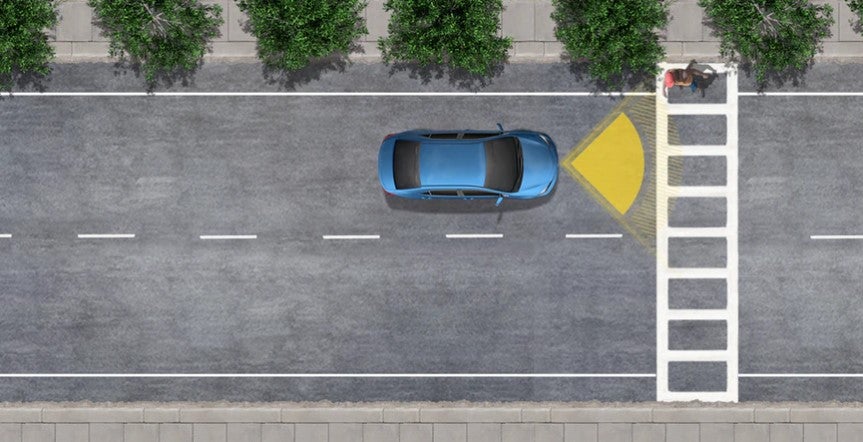
What safety features come standard in the 2020 Toyota Camry? The Toyota Camry has been one of the most popular cars for years and considering this midsize sedan’s versatility and comfort that is fit for single drivers and families alike, it is easy to see why. One of many things that Toyota does exceedingly well is considering the safety of its drivers, no matter what vehicle in the lineup we’re talking about. Given the popularity of this particular car, we wanted to talk about what safety f eatures come standard in the 2020 Toyota Camry so you and your family can be informed. Use Bluetooth® connectivity in your new Toyota Toyota Safety Sense P (TSS-P) Some safety features are a given in any car, no matter the style, size, or brand, but Toyota goes beyond your typical items. In the 2020 Toyota Camry, you will find standard Toyota Safety Sense P (TSS-P), which is a suite of smart technology to help protect you and your passengers. The Pre-Collision System with Pedestrian Detection (PCS w/PD) uses millimeter-wave radar and a shape-recognizing camera to alert you to a possible collision under specific circumstances. If you don’t react in time, the system is designed to provide some automatic braking for you to assist in the process. Full-Speed Range Dynamic Radar Cruise Control is meant to be used at highway speeds to help you maintain a constant speed even when the traffic ahead speeds up or slows down. Lane Departure Alert with Steering Assist works to detect if you’re dri fting out of your lane to alert you, and even help steer you back into place. Automatic High Beams, which will activate at speeds over 25 mph, will be able to help you see even better at night. Star Safety System™ Another standard safety feature on the 2020 Camry is the S t ar Safety System. This consists of enhanced Vehicle Stability Control (VSC), Traction Control (TRAC), the Anti-lock Brake S y stem (ABS), Electronic Brake-force D i stribution (EBD), B r ake Assist (BA), and Smart Stop Technology (SST). Does the 2020 Toyota Camry come with Android Auto™?
Can you get Apple CarPlay® or Android Auto™ in the new Highlander?
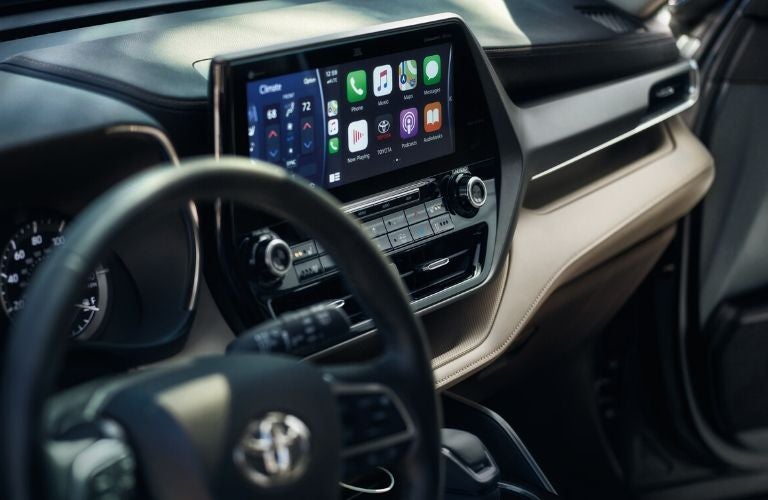
Does the 2020 Toyota Highlander include Android Auto? The popular Toyota Highlander has been completely redesigned for the 2020 model year, and in addition to looking great on the outside, it has plenty of interior features and amenities to make the driving experience a good one for everyone inside. What about the technology and connectivity features? Does the 2020 Toyota Highlander include Android Auto? Yes, as well as Apple CarPlay and A mazon Alexa compatibility. Read ahead to find out more about each of these infotainment features. Can you get Android Auto in the 2020 Toyota RAV4? 2020 Toyota Highlander multimedia and infotainment systems The magnificent 2020 Toyota Highlander serves up a plethora of standard infotainment features so you can keep connected to the outside world safely while you’re running errands or taking long road trips. The standard infotainment touchscreen is eight inches, but in higher trim levels, you can upgrade that to a 12.3-inch screen. Apple CarPlay Users of the iPhone interface will find it easy to connect to the 2020 Highlander and make use of certain features, including hands-free messaging and calling, navigation through Apple Maps, playlists with Apple Music, and more, all while still being able to pay attention to the road ahead. Android Auto If your preferred smartphone operating system is Android, you’ll be able to sync up to the new Highlander as well! With Android Auto, you can take advantage of hands-free calling and messaging, Google Maps navigation, your favorite streaming music, and more. Amazon Alexa If you have an Amazon account and use an Alexa device, you may be pleased to know that you can still use Alexa to a certain extent while behind the wheel of the 2020 Highlander, as it is compatible with Amazon Alexa and can support that functionality. 2020 Toyota Highlander for sale in San Francisco and the Bay Area If you want to climb aboard the 2020 Highlander and see these features for yourself, we would be happy to provide demonstrations! Contact us to find out how you can get behind the wheel of the 2020 Highlander today. Who played the driver in the 2020 Toyota Highlander Super Bowl ad?